Know what the week actually paid you
Log your gross, fuel, dispatch fee and every expense as it happens. TruckLedger gives you the net you really took home, your cost per mile, and a year-to-date total your accountant can use.
On iPhone: tap Share, then Add to Home Screen.
Runs in the browser. No app store, no download.
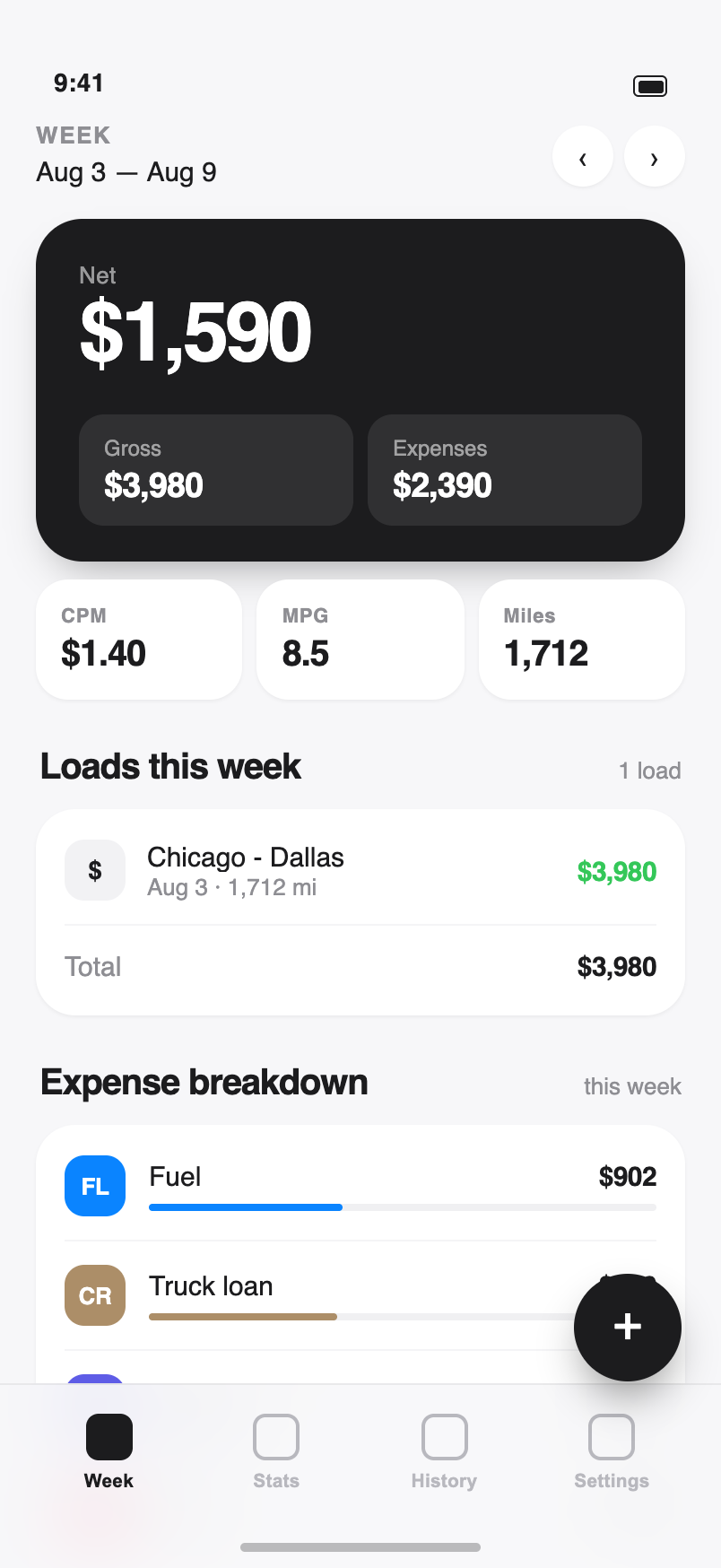
Every number that decides your week
Most drivers know their gross. Far fewer know what is left after fuel, the dispatcher's cut, tolls and the repair nobody planned for. TruckLedger keeps all of it in one place.
Weekly gross and net
Your gross, your expenses and the net that is actually yours — for the current week, laid out the moment you open the app.
Revenue and cost per mile
Log the odometer once a week — TruckLedger subtracts the last reading and works out the real mileage, then RPM, CPM and average MPG from it. More accurate than counting load miles alone, since it catches the empty miles too.
Percentage pay, done right
Company driver on a percent of gross? Set your percent and say whether fuel comes off before or after it. Tiered rates are covered too — a higher percent once the week's gross clears your threshold.
Year-to-date for taxes
Every expense totalled by category since January, ready to export as CSV for your accountant or your own spreadsheet.
Cash, check and wire kept apart
Mark how each load was paid. The report splits income into three color-coded lines, so you see at a glance how much never went through the bank.
Run a fleet — up to 30 drivers
Add each driver with his own percent of gross. See stats for one driver at a time, or all trucks combined — what came in, how many miles, what each driver is owed.
Renewals that sneak up on you
Enter the dates for insurance, registration, maintenance and IFTA. The app flags each one as due soon, due today or overdue — before it costs you a violation. Dates are kept on the phone you enter them on.
History you can search
Filter by category, or search your notes and load names to pull up any entry from months back. Delete a wrong one — and undo it if you were too quick.
Opens with no signal
Add it to your home screen and it opens like a normal app — in a dead zone, in a yard, at a scale house.
Twelve categories, built for this job
Not a generic budgeting app with "Transportation" as one line. These are the things that actually come out of a driver's week.
Two ways to get paid, two sets of math
Pick your work type in Settings and the whole app follows it.
Owner-operator
The truck is yours, so everything hits your pocket. Track the full gross against fuel, DEF, insurance, the truck loan, repairs and tolls, and watch your margin and cost per mile week over week.
Company driver
You are paid a percent of the gross. Set that percent, choose whether fuel is deducted before it, and TruckLedger separates your take-home from what you spent out of pocket on food, parking, tickets and towing.
How it works
Under a minute per stop. That is the whole discipline.
-
Log the load
Name the load and enter the gross. It lands in this week straight away.
-
Add costs as you pay
Fuel — amount and gallons, nothing extra. The dispatch fee, a toll, a scale ticket.
-
Read the week
Net, RPM, CPM, fuel share and margin — then weeks, months, years, or any date range you pick, plus a tax-time export.
Questions drivers ask
Who is TruckLedger for?
Both owner-operators and company drivers. Owner-operators track the full gross against every expense. Company drivers set their percent of gross and see take-home pay plus what they paid out of pocket.
Do I have to install anything?
No. TruckLedger runs in your phone's browser. You can add it to the home screen so it opens full screen like a regular app, and it still opens when you have no signal — though saving a new entry needs a connection.
Does it handle percentage pay with fuel deducted first?
Yes. Set your percent of gross, then choose whether fuel comes off the gross before your percent is calculated or after. The weekly numbers update to match how you are actually paid.
Can I get my numbers out for taxes?
The tax screen totals your year-to-date expenses by category, and you can export everything to a CSV file to hand to your accountant or open in a spreadsheet.
Can it remind me about IFTA and insurance renewals?
Yes. Enter the due dates for insurance, registration, maintenance and IFTA in Settings, and the app shows a banner when something is due soon, due today, or already overdue. These dates are stored on the device you enter them on, so set them again if you switch phones.
What languages does TruckLedger support?
English, Russian, Spanish, Ukrainian and Armenian. You can switch language at any time in Settings.
How is cost per mile calculated?
CPM is your total expenses for the period divided by the miles you logged. Log the odometer once a week and TruckLedger works out the miles since the last reading.
Can I manage more than one driver?
Yes. An owner-operator can add up to 30 drivers, each with their own pay percent. Stats work per driver or for the whole fleet at once.
Start with this week
Create an account, log one load and one fuel stop, and you will already see a number most drivers only find out at settlement.